Tag: software

  • Affinity by Canva is now FREE!

    Affinity by Canva is now FREE!

    Affinity by Canva logo

    Grab your free copy of Affinity by Canva here https://www.affinity.studio/

    In March of 2024 Canva acquired Affinity from Serif, and now in 2025 in a surprise move have made the Affinity suite an all in one application and offer it FREE forever.
    The product suite includes:

    • Graphic design
      Everything you need for vector design and digital illustration
    • Photo editing
      Professional image editing and retouching tools
    • Page layout
      The most powerful page layout and design tools
    • Canva integrations (with a Canva PRO account)
      Streamline workflows with Canva AI and easy export
  • On1 Photo Raw 2026(Beta) vs Adobe LR&PS

    On1 Photo Raw 2026(Beta) vs Adobe LR&PS

    On1 Photo Raw
    On1 Photo Raw
    On1 Photo Raw MAX
    On1 Photo Raw MAX

    A quick functionality test

    In this post I do a quick comparison of the same 5 images processed in both On1 Photo Raw 2026(beta) and Adobe Lightroom/Photoshop. They are both very capable image processors. I used the MAX version of On1 Photo Raw, but the standard version has the same capabilities.

    Sample images processed in Adobe Lightroom and On1 Photo Raw 2026

    Before imageAfter image
    Before imageAfter image
    Before imageAfter image

    Sample focus stacks processed in Adobe LR&PS and On1 Photo Raw 2026

    Before imageAfter image
    Before imageAfter image

    Both applications work and can produce excellent results, with some notable differences in how they handle color and masking. Adobe’s masking AI is very good at identifying and separating many features in an image (water, vegetation, landscape, artificial ground, mountains, sky, buildings, people, subject, background) and auto masking the entire image in a couple of clicks. On1’s new masking in the 2026 beta version is good but not quite up to that level yet. Though this is a beta version and new capabilities are being added and refined constantly. Other than that, in both On1 and Lightroom it is just a matter of personal preference on how you move the sliders around to get the image you want. Photoshop being a full and very complex editor is not quite as initiative and simple to utilize.

    On1 Photo Raw 2026(beta)

    • All in one application
    • MAX version includes plugin for Lightroom
    • includes built in image stacking
    • Includes new AI auto masking
    • Includes Resize AI
    • Mostly AI driven with user fine control overrides
    • Built in library manager
    • Pay once, use that version forever
    • Many new features included in 2026 release I have not tried yet.

    Adobe

    • need to bounce between LR and PS to get all full features
    • very good AI auto masking
    • Limited free generative AI features, accessing premium Firefly features requires purchasing monthly AI credits.
    • Excellent top shelf Digital Asset Manager * This is the one feature I can’t get away from *
    • Pay monthly (or yearly) to keep accessing application(s)

    On1 Photo Raw 2026 will be available October 13!

  • On1 Photo Raw 2025 is here

    On1 Photo Raw 2025 is here

    ON1 Photo RAW 2025: Unmatched Photo Editing Power with AI Tools and Much More!

    Portland, OR—September 3, 2024—ON1, the developers of professional-grade photo editing software, proudly announce the upcoming release of ON1 Photo RAW 2025. This latest version will include an incredible blend of new technologies, features, and significant improvements to existing tools. The release is currently slated for October.

    Revolutionizing Retouching with Generative AI and Depth-Aware Editing

    ON1 Photo RAW 2025 introduces new and powerful generative AI features that enhance the content-aware capabilities of both the crop and new Generative Erase tools. These updates enable photographers to extend canvases more naturally and remove large distractions, like people or cars, while filling in missing details with realistic results. Additionally, the new Depth Masks feature utilizes powerful AI models to infer the depth within a scene, allowing photographers to blend or apply adjustments or effects based on the scene’s depth. This adds a layer of control that hasn’t existed before, making effects like lens blur and other adjustments more natural.

    Automated Editing Tasks for Removing Common Distractions

    The introduction of automatic detection and removal of common distractions, like sensor dust and power lines are also new features coming in this release.

    Enhanced Color Editing & Layout Creation

    ON1 Photo RAW 2025 expands its color editing capabilities with two new filters. The Edit Color filter offers precise hue, saturation, and brightness control within specific color ranges. The new Match Color filter allows photographers to apply the color from one image to another, making it the perfect tool to mimic others’ looks and style. Additionally, improvements to the new canvas dialog simplify the creation of layouts, making it easier to set common sizes and add your photos in one step.

    Streamlined Organization

    Photo organization will also be enhanced with the new Target Album feature, allowing users to set an album as a target and quickly add photos to the album with a shortcut key. This will help streamline sorting through extensive collections of images, making album management faster.

    To further enhance the organization of your photos, ON1 Photo RAW 2025 introduces Stacking. This feature is handy for organizing brackets, bursts, and other grouped shots, reducing clutter and speeding up the culling process.

    What’s Coming Next

    Looking forward, ON1 is excited to reveal several features and updates that will arrive soon after the initial release of version 2025. These include Generative Replace, allowing users to seamlessly add new elements to their photos by simply describing what they want. The Super Select AI tool for selections will also be enhanced, allowing users to point, click, and erase entire objects from their images, streamlining the editing process.

    Additionally, Document Templates will provide professionally designed layouts for various projects, and Face Restoration in Edit will bring cutting-edge facial enhancement to Photo RAW 2025.

    The new Edit Camera Profiles dialog will allow photographers to fine-tune the default colors their cameras produce, allowing for greater customization of color. This feature will be great for those looking to adjust certain color nuances, like making reds more saturated or shifting greens to enhance foliage.

    Improved Perspective Correction tools will also be introduced, making it easier to adjust horizontal and vertical keystoning while automatically scaling photos to prevent transparent corners. This improvement ensures that users always have a full layer of pixels.

    Price and Availability

    Pre-order a license for ON1 Photo RAW MAX 2025 with plugin capabilities ($149.99 upgrade, or $169.99 for new customers) or Photo RAW 2025 for standalone use only ($79.99 upgrade, or $99.99 for new customers), and receive the new ON1 2025 Creative Pack of 100 presets, LUTs, and extras delivered with Photo RAW 2025 this fall. Customers who pre-order version 2025 can use Photo RAW 2024.5 until the new version is released. Photo RAW MAX 2025 is also available as part of the ON1 Everything Subscription Plans, which include all of the current ON1 editing applications and plugins for Photoshop, Lightroom, Capture One, Affinity, Corel PSP, and Apple Photos, along with ON1 Cloud Sync storage and all future versions of each software title in the plans.

    About ON1 Photo RAW

    Elevate your photo editing game with ON1 Photo RAW. Perfect for photographers of all skill levels, ON1 Photo RAW offers an intuitive yet powerful platform that blends speed, versatility, and quality into one AI-powered application. It’s the ultimate AI photo editor and includes everything a photographer needs in one application. Experience why it’s the top Lightroom Alternative, giving you the ultimate control to bring your photographic visions to life.

    Press kit provided by On1

  • Adobe shoots self in foot!

    Adobe shoots self in foot!

    Adobe gives another reason to leave.

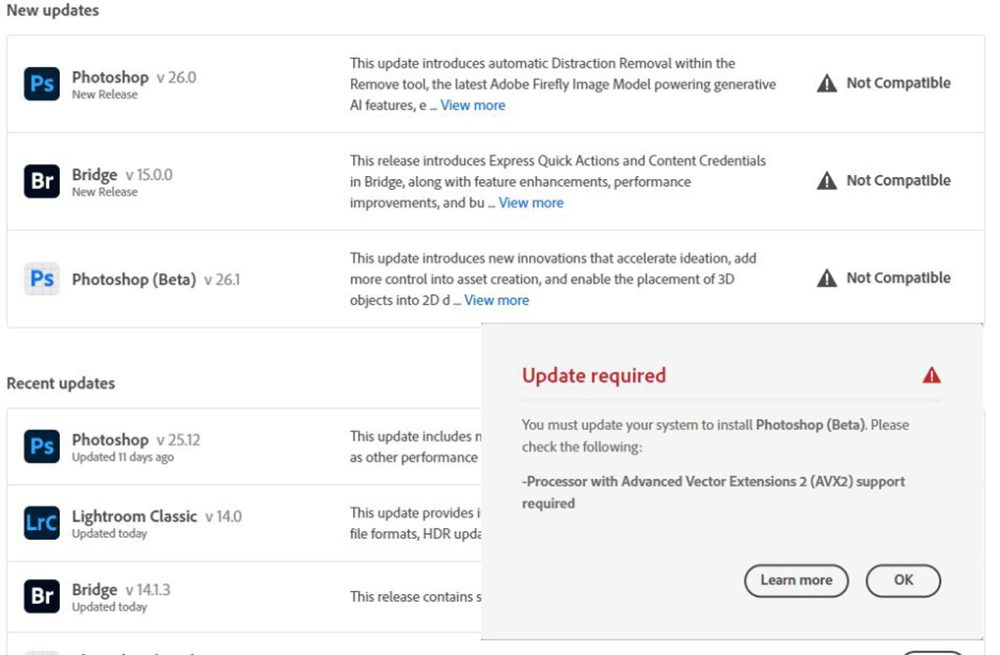
    Well not quite but it really made my decision to exit their ecosystem final. In the last round of auto-updates I got a nice message that many adobe products I had are no longer compatible with my equipment. To keep using their products I needed to upgrade(buy) all new computes. Big Nope, not doing it because they want to add even more AI features to their products.

    Here is the nice screen I got when the Adobe Creative Cloud update process started.

    Adobe update screen showing their products no longer compatible with old hardware.
    Screen shot showing products no longer compatible with hardware

    ON1 keeps on rolling.

    My current pick (even their newest 2025preview) seems to work just fine.

  • Decided to keep pressing onward with On1!

    Decided to keep pressing onward with On1!

    On1 Photo icon
    On1 Photo icon

    While the catalogue location does remain a big issue for me, I am pressing onward as so far I am liking the way On1Photo Raw processes the images. And I am quite impressed with the results of the NoNoise component!

    I think I may try to stick with it for new images, despite the aforementioned catalogue issue described in the previous posting, which would mean I will still need to find something to work as a DAM for my image archives.

    The New Truth: I have joined the On1 affiliate team so going forward any links to On1 products will most likely be affiliate links.

    Here’s one. 😎


  • The First hurdle migrating to On1 Photo Raw

    The First hurdle migrating to On1 Photo Raw

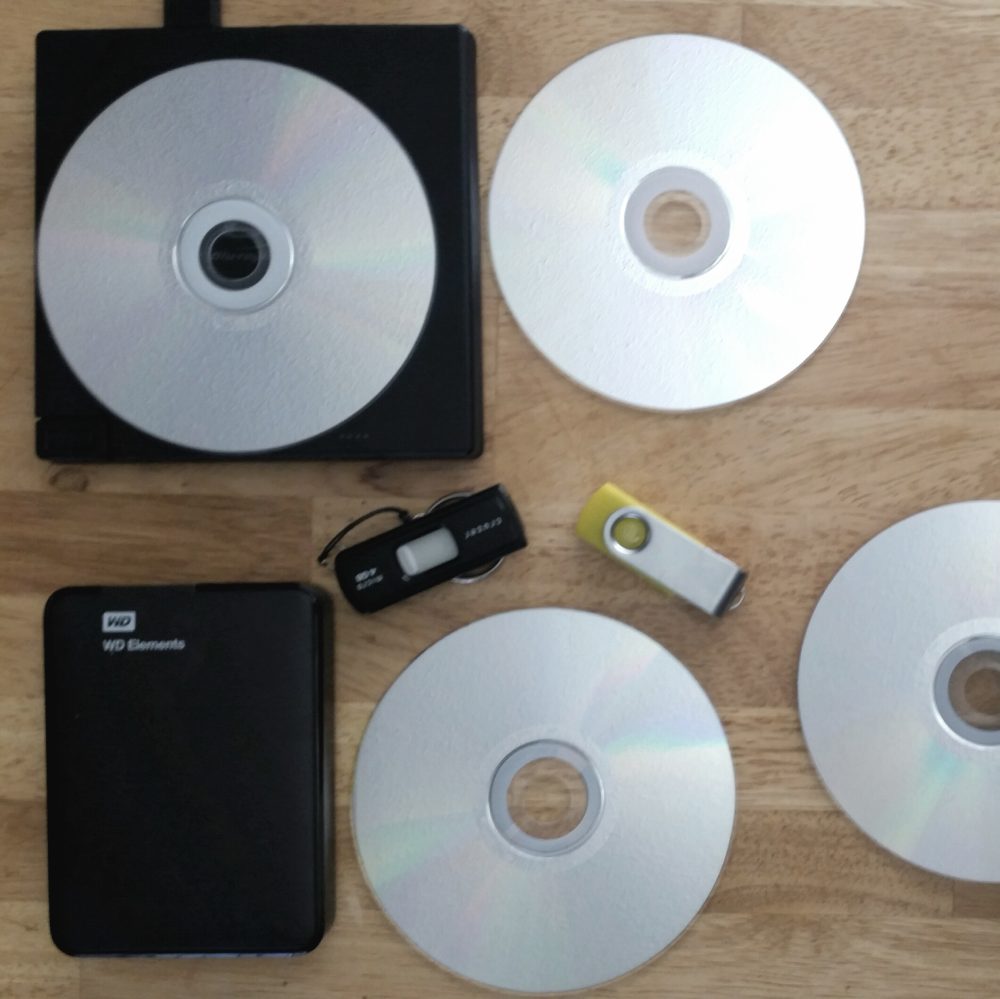
    disks & thumbs storage
    Location, It’s all about the storage location

    The first hurdle in trying to migrate to On1 Photo Raw from Adobe Photoshop/Lightroom has already been encountered. And for me it is a major one, is the catalogue database, in particular the location.

    Coming from UNIX background, on my setup the main workstation Operating System (windows) lives on a small 256gb ssd file-system, my LightRoom catalogues are on a dedicated 1tb internal ssd and all my images are out on a many TB NAS. There is no space on the OS file-system to store large catalogues.
    I fear what would happen to the OS file-system if I pointed On1photo to the NAS with almost 50 years of work in poking around the imaging industry.

    I did try fooling it by moving the %appdata%/ON1 folder to the catalogue drive and creating a symlink to it in %appdata% but all on1 did on startup was ignore the symlink and it recreate the local folder, kind of useless. and most likely kills this option as a workable DAM (Digital Asset Management) system.
    In LightRoom you can put the catalogues anywhere and just point to them in the app settings.

    This same issue is what killed my attempt at using ACDsee which also seem to insist on storing it catalogue on %appdata%

  • Top 10 Software I use for editing

    Top 10 Software I use for editing

    disks & thumbs storage
    disks & thumbs storage

    These are the new and just updated for 2023 TOP 10 software packages I currently use for my image and video editing. As well as the hardware I use to run them on.

    Surprisingly six of the ten programs can be had FREE for non-commercial use!
    While three are subscription model products, and one is free but requires custom proprietary hardware.

    Links to all the applications both free and paid are at the bottom of page.

    The Software

    What I edit still images with:

    NameDescription
    Adobe Creative Cloud Lightroom ClassicImage developer and catalog
    Adobe Creative Cloud PhotoshopImage Editor
    PicolayFocus stacker by Heribert Cypionka
    What I use to edit still images

     My image catalog database is currently

    • Adobe Creative Cloud Lightroom  (Image developer and catalog)

    What I create videos with:

    NameDescription
    Blackmagic DaVnci Resolve 18Insanely powerful video and audio editor
    OBS StudioScreen capture and live stream
    qDslr dashboardTethering and time-lapse
    HandbrakeVideo converter
    AudacityAudio editor
    What I uses to create videos

    The Hardware

    The Monitors

    • ASUS ProArt PA248 (Main image editing display)
    • Samsung S27R350 (Text and control panels)
    • Samsung S27R350 (everything else)

    The rapidly ageing eaters of bits

    • Custom built Intel I7 system with
      • 32Gb RAM
      • 2 * 512Gb SSD + 2 * 4Tb sata3 internal drives
      • Nvidea rtx 1650 4Gb video card
      • Wacom Intuos 3 9*12 tablet
    • Custom built Intel I5 system with
      • 16Gb RAM
      • 512Gb SSD + 4Tb sata3
      • Nvidea rtx 1030 2Gb video card

    Backup & Stability

    • Acronis Cyber Protect Home Office (data backup)
    • A random array of Western Digital external drives (backup medium, on and offsite)
    • Apc UPS unit(s) (power stabilization)

    Here are the links to all the products if you want to get any them

    Links will open new tabs or windows.

    Paid/subscription

    NameDescription and linkPlatform
    Adobe Photography bundleincludes both Lightroom & Photoshop for $9.99us/month http://bit.ly/2rbDvvFw m
    Acronis Cyber Protect Home Office(search web for discount coupons!) http://bit.ly/Acronisppw m a i
    Paid software – platform: w = Windows, m = Mac, a = Android, i = Ios

    Free!

    The following seven six products I use can all be downloaded and used for free!

    NameDescription and linkPlatform
    BlackMagic DaVinci Resolve 18(video/audio editor) http://bit.ly/resolvepp – non commercial usew m
    Microsoft ICE(Panorama stitcher) – no longer availablew
    Picolay(Focus stacker, 3d renderer) http://bit.ly/picolayw
    Handbrake(video converter) https://handbrake.fr/w m l
    Audacity(audio editor)  http://bit.ly/audadityppw m l
    qDslr Dashboard(remote camera control)   http://bit.ly/2IVppWf
    Wired, wireless, timelapse, bramping, focus stacking
    Free on windows/mac and paid app for android/ios 
    all
    wmlair
    WeMacro controller *
    * requires wemacro rail
    WeMacro Focus stacking rail software https://bit.ly/wemacrosww m a i
    Free software – platform: w = Windows, m = Mac, l = Linux, a = Android, i = Ios, r = Raspberry
  • Welcome Adobe to the fold

    Adobe Authorized Affiliate
    Adobe Authorized Affiliate

    (update Adobe switched to a new affiliate manager and I have not yet re-signed up, something to remember to do for the future)

    Just a quick post to welcome Adobe to my Affiliate fold!

    I”ve been using Adobe Photoshop and Lightroom since their initial versions and am super pleased to join with them as an affiliate.