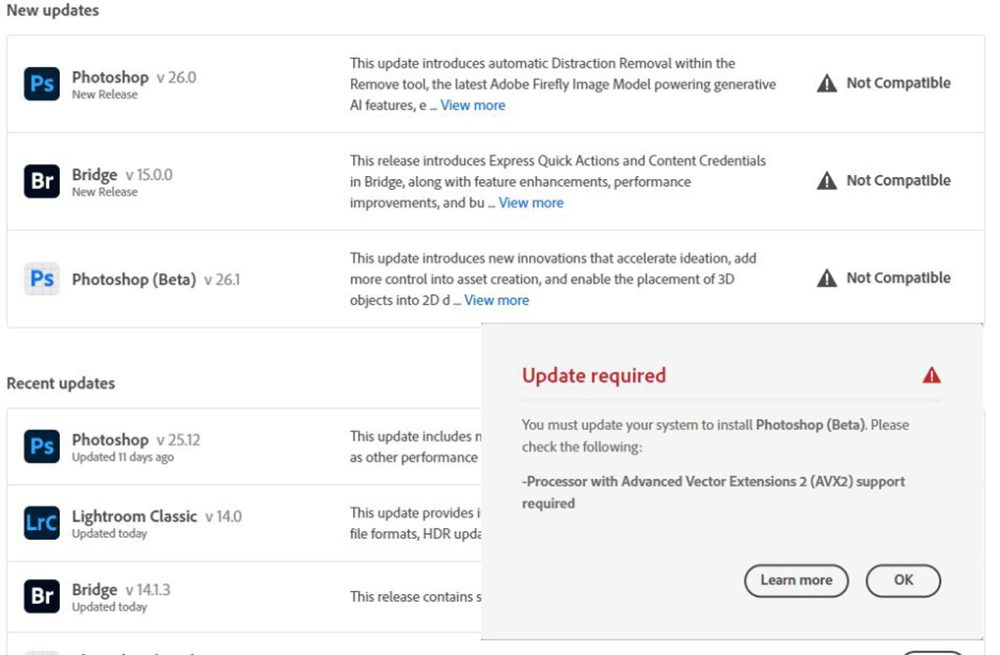
Well not quite but it really made my decision to exit their ecosystem final. In the last round of auto-updates I got a nice message that many adobe products I had are no longer compatible with my equipment. To keep using their products I needed to upgrade(buy) all new computes. Big Nope, not doing it because they want to add even more AI features to their products.
Here is the nice screen I got when the Adobe Creative Cloud update process started.
Screen shot showing products no longer compatible with hardware
ON1 keeps on rolling.
My current pick (even their newest 2025preview) seems to work just fine.
If you want freedom from Adobe because you have finally had enough of the all their BS
You had to accept the latest new TOS (Terms of Service) there was no other option if you needed to keep using the applications and it included suck features like The use of images in the Adobe Creative Cloud for product training, which includes images that are temporarily uploaded to their cloud by using any tools that use server side generative AI features. Spying on what you are doing in their products. Wanting to act like a net-nanny, yes they have an an AI looking at all images arriving in the adobe cloud that kicks out any images it decides do not meet community standards, these are passed on to a human for verification and if deemed actually unacceptable may be passed on to authorities. All you see is a “does not meet community standards warning. Not to forget the constant fingers in your wallet.
like I have and have started to actively work on moving away from Adobe products.
I quickly discovered I am stuck until my yearly contract runs out, unless I want to pay a hefty early cancellation fee.
00Days
00Hours
00Minutes
00Seconds
Countdown until I can cancel with little to no penalty and have to do it before the dam thing automatically renews for another year.
Did you know in the Adobe fine print that the monthly subscription you signed up for is actually a yearly subscription paid monthly? AND to cancel they fine you a 50% early cancellation fee for any remaining time if you try to cancel mid term.
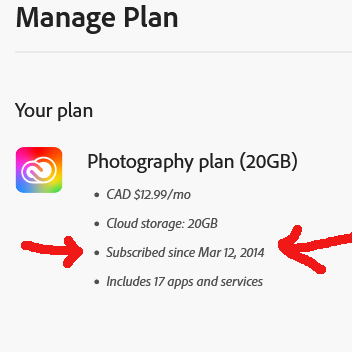
Finding your subscription anniversary date
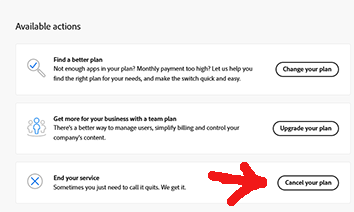
And the location of the cancellation process
This turns out to be a 5 step process to locate both your subscription anniversary date and the location of the cancel plan option. Step 1: sign in to your adobe account
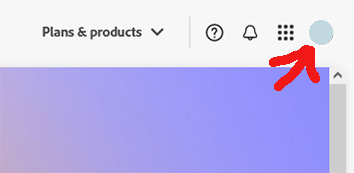
Step 2: select your icon/avatar in the upper right
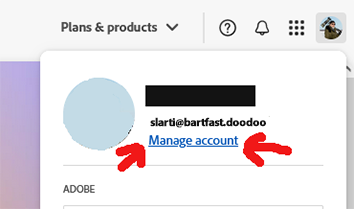
Step 3: select the Manage account link
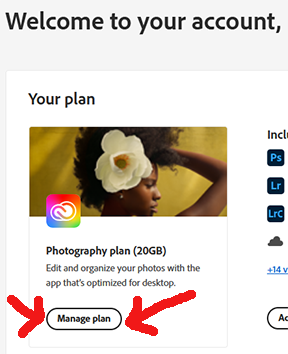
Step 4: select the Manage plan bubble, this will open a popup
Step 5a: The popup will show your original subscribed date.
Step 5b: And finally near the bottom right side of the popup page it should include a cancel plan option that triggers the cancellation process.
On1 PhotoRaw 2025 coming in October!
My current pick for a replacement to Adobe is getting a major update to the 2025 version in October with many new AI enhanced features.
The first hurdle in trying to migrate to On1 Photo Raw from Adobe Photoshop/Lightroom has already been encountered. And for me it is a major one, is the catalogue database, in particular the location.
Coming from UNIX background, on my setup the main workstation Operating System (windows) lives on a small 256gb ssd file-system, my LightRoom catalogues are on a dedicated 1tb internal ssd and all my images are out on a many TB NAS. There is no space on the OS file-system to store large catalogues. I fear what would happen to the OS file-system if I pointed On1photo to the NAS with almost 50 years of work in poking around the imaging industry.
I did try fooling it by moving the %appdata%/ON1 folder to the catalogue drive and creating a symlink to it in %appdata% but all on1 did on startup was ignore the symlink and it recreate the local folder, kind of useless. and most likely kills this option as a workable DAM (Digital Asset Management) system. In LightRoom you can put the catalogues anywhere and just point to them in the app settings.
This same issue is what killed my attempt at using ACDsee which also seem to insist on storing it catalogue on %appdata%
This site or affiliated service providers may use cookies, continuing to access resources on this sites constitutes an acceptance to the use of cookies and our Terms of Service.