Author: Peter

  • Holiday Sales

    Holiday Sales

    Most Holiday Sales are over for the 2025 season.


    Glass.photo               glass photo logo

    Glass.photo is a paid, global community platform for photographers.
    With no ads, manipulative algorithms or data tracking.

    You can create a Guest account and browse around glass for free, but need to subscribe to upload or comment on images.

    Glass.photo Memberships

    Guest Member free, browse access only.

    Use my referral code to get 25.01% off. Get full access for 29.99$ for the first year, then 39.99$ a year.

    👉 Snap the link to join Glass Photo! https://glass.photo/referral/43IVMHCC25M6


    BlackMagic Davinci Resolve                davinci resolve logo

    Simply the best nodal video editor there is and it’s available for free (non commercial use only)
    Or for a low one time (no subscriptions) fee of 295$ for the full commercial use version.

    Hit the link to grab your copy https://www.blackmagicdesign.com/products/davinciresolve


  • Glass Photo  – A new kind of community!

    Glass Photo – A new kind of community!

    glass photo logo

    Glass Photo

    Discovering Glass: A Home for Photographers Who Value Craft Over Algorithms

    If you’re a photographer today, you know the feeling: you post an image you love, and it disappears into the feed unless it fits a trend, hits a perfect time slot, or pleases an algorithm. It can feel less about photography—and more about playing a game.

    Glass is something different. It’s a photography-first community built intentionally for people who care about images, craft, and meaningful connection. No ads. No algorithmic ranking. No growth hacks—just photography.


    What is Glass?

    Glass is a subscription-based social platform designed specifically for photographers. Think of it as a modern gallery space where images come first and engagement comes from appreciation, not metrics. The feed is chronological and human, with no ads competing for attention and no algorithm deciding what you should see.

    It’s built for photographers of all levels—professionals, hobbyists, film shooters, digital explorers, artists working in alternative processes, and everyone in between. Whether you’re sharing a portfolio, documenting personal projects, or simply enjoying others’ work, the experience feels refreshingly focused and intentional.


    Why People Love Glass

    1. Photography comes before popularity

    Images aren’t drowned out by memes, reels, or viral content. You show your work, and people see it—no boosted posts, no algorithmic lottery.

    2. A supportive, thoughtful community

    Glass feels more like a community darkroom or a friendly gallery opening. Comments tend to be constructive, curious, and kind. Conversations are slower, and that’s a feature, not a bug.

    3. Built for showcasing the art itself

    Large, high-quality image presentation is at the core of the platform. Your work isn’t compressed into a tiny square or overshadowed by UI clutter. On Glass, photography can breathe.

    4. Privacy-respecting and ad-free

    You own your work, and you’re not the product. The experience is calm—no targeted ads, tracking, or engagement-pressure metrics. Just creativity.

    5. Great for discovering inspiration

    Because feeds are chronological and curated through human interest, discovering new artists feels organic—like browsing through portfolios and stumbling onto someone’s style you instantly connect with.


    Why You Should Be Interested

    If you’re tired of the noise of mainstream social platforms and want a space where photography is appreciated for its craftsmanship, Glass is worth exploring. It invites you to slow down, look closer, and share work that matters to you—not just what’s trending.

    It’s a place to:

    💡 Build a meaningful archive of your work
    🗣 Connect with photographers who share your passion
    📷 Find inspiration beyond the algorithm
    🤝 Be part of a community dedicated to the art of photography

    Whether you shoot street, portrait, landscape, experimental, film, or digital—Glass gives your images the space and respect they deserve.


    Final Thoughts

    Glass isn’t about chasing followers—it’s about sharing art. It’s a refuge for photographers who value intention over hustle, and a reminder that photography can still be slow, thoughtful, and human.

    If that sounds like a breath of fresh air, come take a look. There’s a community waiting for you.
    Here’s my profile—come say hi: Peter at Glass Photo


    Referral Code

    Use my referral code to get 25.01% off. Get full access for 29.99$ for the first year, then 39.99$ a year.

    https://glass.photo/referral/43IVMHCC25M6

  • Black Friday and Cyber Monday Sales!

    Black Friday and Cyber Monday Sales!

    Sales are over for this years Black Friday and Cyber Monday


    On1                On1 Photo Raw MAX

    Sales ended.

    Missed it.

    👉 Hit the link to get On1 ! https://on1.sjv.io/YRoy4e


    Glass.photo               glass photo logo

    Glass.photo is a paid, global community platform for photographers.
    With no ads, manipulative algorithms or data tracking.

    You can create a Guest account and browse around glass for free, but need to subscribe to upload or comment on images.

    Glass.photo Memberships

    Guest Member free, browse access only.

    Member
    14 days free – $39.99 per year

    Patron
    14 days free – $129.99 per year

    Use my referral code to get 25.01% off. Get full access for 29.99$ for the first year, then 39.99$ a year.

    👉 Snap the link to join Glass Photo! https://glass.photo/referral/43IVMHCC25M6


    Topaz Labs               

    Sales ended.

    Missed it.

    👉 Grab the Topaz Labs here: https://topazlabs.com/ref/123/


    BlackMagic Davinci Resolve                davinci resolve logo

    Simply the best nodal video editor there is and it’s available for free (non commercial use only)
    Or for a low one time (no subscriptions) fee of 295$ for the full commercial use version.

    Hit the link to grab your copy https://www.blackmagicdesign.com/products/davinciresolve


    Affinity by Canva                Affinity by Canva Logo

    Grab your free copy of Affinity by Canva here https://www.affinity.studio/

    Canva acquired Affinity and now in a surprise move have made the Affinity suite FREE forever.
    The product suite includes:

    • Graphic design
      Everything you need for vector design and digital illustration
    • Photo editing
      Professional image editing and retouching tools
    • Page layout
      The most powerful page layout and design tools
    • Canva integrations (with a Canva PRO account)
      Streamline workflows with Canva AI and easy export

    Adorama                Adorama Logo

    Sales ended.

    Missed it.

    Check out the deals here: https://www.adorama.com/g/cyber-monday-deals


    Scuba.com                Scuba com Logo

    Sales ended.

    Missed it.

    Dive into deals here: https://www.scuba.com/


  • Affinity by Canva is now FREE!

    Affinity by Canva is now FREE!

    Affinity by Canva logo

    Grab your free copy of Affinity by Canva here https://www.affinity.studio/

    In March of 2024 Canva acquired Affinity from Serif, and now in 2025 in a surprise move have made the Affinity suite an all in one application and offer it FREE forever.
    The product suite includes:

    • Graphic design
      Everything you need for vector design and digital illustration
    • Photo editing
      Professional image editing and retouching tools
    • Page layout
      The most powerful page layout and design tools
    • Canva integrations (with a Canva PRO account)
      Streamline workflows with Canva AI and easy export
  • On1 Photo Raw 2026(Beta) vs Adobe LR&PS

    On1 Photo Raw 2026(Beta) vs Adobe LR&PS

    On1 Photo Raw
    On1 Photo Raw
    On1 Photo Raw MAX
    On1 Photo Raw MAX

    A quick functionality test

    In this post I do a quick comparison of the same 5 images processed in both On1 Photo Raw 2026(beta) and Adobe Lightroom/Photoshop. They are both very capable image processors. I used the MAX version of On1 Photo Raw, but the standard version has the same capabilities.

    Sample images processed in Adobe Lightroom and On1 Photo Raw 2026

    Before imageAfter image
    Before imageAfter image
    Before imageAfter image

    Sample focus stacks processed in Adobe LR&PS and On1 Photo Raw 2026

    Before imageAfter image
    Before imageAfter image

    Both applications work and can produce excellent results, with some notable differences in how they handle color and masking. Adobe’s masking AI is very good at identifying and separating many features in an image (water, vegetation, landscape, artificial ground, mountains, sky, buildings, people, subject, background) and auto masking the entire image in a couple of clicks. On1’s new masking in the 2026 beta version is good but not quite up to that level yet. Though this is a beta version and new capabilities are being added and refined constantly. Other than that, in both On1 and Lightroom it is just a matter of personal preference on how you move the sliders around to get the image you want. Photoshop being a full and very complex editor is not quite as initiative and simple to utilize.

    On1 Photo Raw 2026(beta)

    • All in one application
    • MAX version includes plugin for Lightroom
    • includes built in image stacking
    • Includes new AI auto masking
    • Includes Resize AI
    • Mostly AI driven with user fine control overrides
    • Built in library manager
    • Pay once, use that version forever
    • Many new features included in 2026 release I have not tried yet.

    Adobe

    • need to bounce between LR and PS to get all full features
    • very good AI auto masking
    • Limited free generative AI features, accessing premium Firefly features requires purchasing monthly AI credits.
    • Excellent top shelf Digital Asset Manager * This is the one feature I can’t get away from *
    • Pay monthly (or yearly) to keep accessing application(s)

    On1 Photo Raw 2026 will be available October 13!

  • On1 Photo Raw 2025 is here

    On1 Photo Raw 2025 is here

    ON1 Photo RAW 2025: Unmatched Photo Editing Power with AI Tools and Much More!

    Portland, OR—September 3, 2024—ON1, the developers of professional-grade photo editing software, proudly announce the upcoming release of ON1 Photo RAW 2025. This latest version will include an incredible blend of new technologies, features, and significant improvements to existing tools. The release is currently slated for October.

    Revolutionizing Retouching with Generative AI and Depth-Aware Editing

    ON1 Photo RAW 2025 introduces new and powerful generative AI features that enhance the content-aware capabilities of both the crop and new Generative Erase tools. These updates enable photographers to extend canvases more naturally and remove large distractions, like people or cars, while filling in missing details with realistic results. Additionally, the new Depth Masks feature utilizes powerful AI models to infer the depth within a scene, allowing photographers to blend or apply adjustments or effects based on the scene’s depth. This adds a layer of control that hasn’t existed before, making effects like lens blur and other adjustments more natural.

    Automated Editing Tasks for Removing Common Distractions

    The introduction of automatic detection and removal of common distractions, like sensor dust and power lines are also new features coming in this release.

    Enhanced Color Editing & Layout Creation

    ON1 Photo RAW 2025 expands its color editing capabilities with two new filters. The Edit Color filter offers precise hue, saturation, and brightness control within specific color ranges. The new Match Color filter allows photographers to apply the color from one image to another, making it the perfect tool to mimic others’ looks and style. Additionally, improvements to the new canvas dialog simplify the creation of layouts, making it easier to set common sizes and add your photos in one step.

    Streamlined Organization

    Photo organization will also be enhanced with the new Target Album feature, allowing users to set an album as a target and quickly add photos to the album with a shortcut key. This will help streamline sorting through extensive collections of images, making album management faster.

    To further enhance the organization of your photos, ON1 Photo RAW 2025 introduces Stacking. This feature is handy for organizing brackets, bursts, and other grouped shots, reducing clutter and speeding up the culling process.

    What’s Coming Next

    Looking forward, ON1 is excited to reveal several features and updates that will arrive soon after the initial release of version 2025. These include Generative Replace, allowing users to seamlessly add new elements to their photos by simply describing what they want. The Super Select AI tool for selections will also be enhanced, allowing users to point, click, and erase entire objects from their images, streamlining the editing process.

    Additionally, Document Templates will provide professionally designed layouts for various projects, and Face Restoration in Edit will bring cutting-edge facial enhancement to Photo RAW 2025.

    The new Edit Camera Profiles dialog will allow photographers to fine-tune the default colors their cameras produce, allowing for greater customization of color. This feature will be great for those looking to adjust certain color nuances, like making reds more saturated or shifting greens to enhance foliage.

    Improved Perspective Correction tools will also be introduced, making it easier to adjust horizontal and vertical keystoning while automatically scaling photos to prevent transparent corners. This improvement ensures that users always have a full layer of pixels.

    Price and Availability

    Pre-order a license for ON1 Photo RAW MAX 2025 with plugin capabilities ($149.99 upgrade, or $169.99 for new customers) or Photo RAW 2025 for standalone use only ($79.99 upgrade, or $99.99 for new customers), and receive the new ON1 2025 Creative Pack of 100 presets, LUTs, and extras delivered with Photo RAW 2025 this fall. Customers who pre-order version 2025 can use Photo RAW 2024.5 until the new version is released. Photo RAW MAX 2025 is also available as part of the ON1 Everything Subscription Plans, which include all of the current ON1 editing applications and plugins for Photoshop, Lightroom, Capture One, Affinity, Corel PSP, and Apple Photos, along with ON1 Cloud Sync storage and all future versions of each software title in the plans.

    About ON1 Photo RAW

    Elevate your photo editing game with ON1 Photo RAW. Perfect for photographers of all skill levels, ON1 Photo RAW offers an intuitive yet powerful platform that blends speed, versatility, and quality into one AI-powered application. It’s the ultimate AI photo editor and includes everything a photographer needs in one application. Experience why it’s the top Lightroom Alternative, giving you the ultimate control to bring your photographic visions to life.

    Press kit provided by On1

  • Adobe shoots self in foot!

    Adobe shoots self in foot!

    Adobe gives another reason to leave.

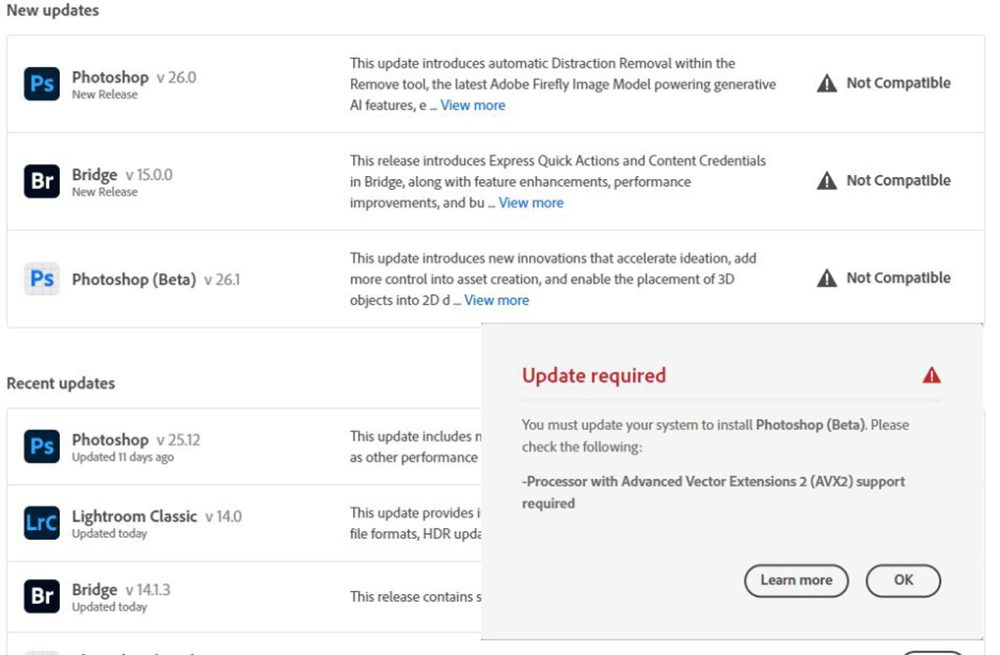
    Well not quite but it really made my decision to exit their ecosystem final. In the last round of auto-updates I got a nice message that many adobe products I had are no longer compatible with my equipment. To keep using their products I needed to upgrade(buy) all new computes. Big Nope, not doing it because they want to add even more AI features to their products.

    Here is the nice screen I got when the Adobe Creative Cloud update process started.

    Adobe update screen showing their products no longer compatible with old hardware.
    Screen shot showing products no longer compatible with hardware

    ON1 keeps on rolling.

    My current pick (even their newest 2025preview) seems to work just fine.

  • Freedom from Adobe

    Freedom from Adobe

    Freedom from Adobe

    If you want freedom from Adobe because you have finally had enough of the all their BS

    You had to accept the latest new TOS (Terms of Service) there was no other option if you needed to keep using the applications and it included suck features like
    The use of images in the Adobe Creative Cloud for product training, which includes images that are temporarily uploaded to their cloud by using any tools that use server side generative AI features.
    Spying on what you are doing in their products.
    Wanting to act like a net-nanny, yes they have an an AI looking at all images arriving in the adobe cloud that kicks out any images it decides do not meet community standards, these are passed on to a human for verification and if deemed actually unacceptable may be passed on to authorities. All you see is a “does not meet community standards warning.
    Not to forget the constant fingers in your wallet.

    like I have and have started to actively work on moving away from Adobe products.

    I quickly discovered I am stuck until my yearly contract runs out, unless I want to pay a hefty early cancellation fee.

    00Days
    00Hours
    00Minutes
    00Seconds

    Countdown
    until I can cancel with little to no penalty and have to do it before the dam thing automatically renews for another year.

    Did you know in the Adobe fine print that the monthly subscription you signed up for is actually a yearly subscription paid monthly? AND to cancel they fine you a 50% early cancellation fee for any remaining time if you try to cancel mid term.

    Finding your subscription anniversary date

    And the location of the cancellation process

    This turns out to be a 5 step process to locate both your subscription anniversary date and the location of the cancel plan option.
    Step 1: sign in to your adobe account

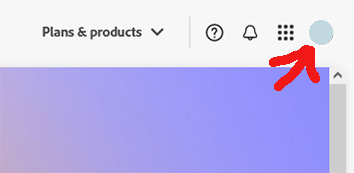
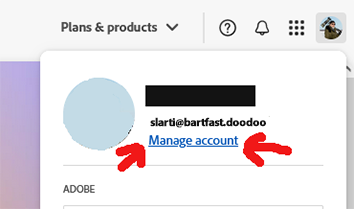
    Step 2: select your icon/avatar in the upper right

    Step 3: select the Manage account link

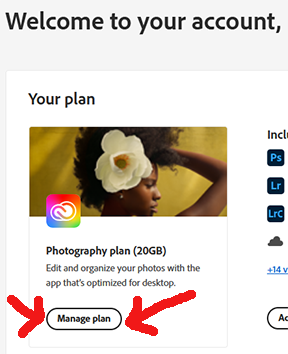
    Step 4: select the Manage plan bubble, this will open a popup

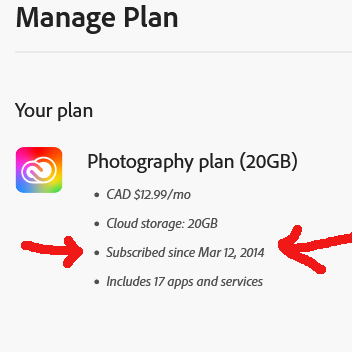
    Step 5a: The popup will show your original subscribed date.

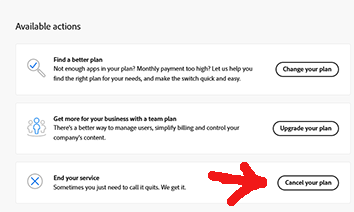
    Step 5b: And finally near the bottom right side of the popup page it should include a cancel plan option that triggers the cancellation process.

    On1 PhotoRaw 2025 coming in October!
    My current pick for a replacement to Adobe is getting a major update to the 2025 version in October with many new AI enhanced features.


  • Decided to keep pressing onward with On1!

    Decided to keep pressing onward with On1!

    On1 Photo icon
    On1 Photo icon

    While the catalogue location does remain a big issue for me, I am pressing onward as so far I am liking the way On1Photo Raw processes the images. And I am quite impressed with the results of the NoNoise component!

    I think I may try to stick with it for new images, despite the aforementioned catalogue issue described in the previous posting, which would mean I will still need to find something to work as a DAM for my image archives.

    The New Truth: I have joined the On1 affiliate team so going forward any links to On1 products will most likely be affiliate links.

    Here’s one. 😎


  • The First hurdle migrating to On1 Photo Raw

    The First hurdle migrating to On1 Photo Raw

    disks & thumbs storage
    Location, It’s all about the storage location

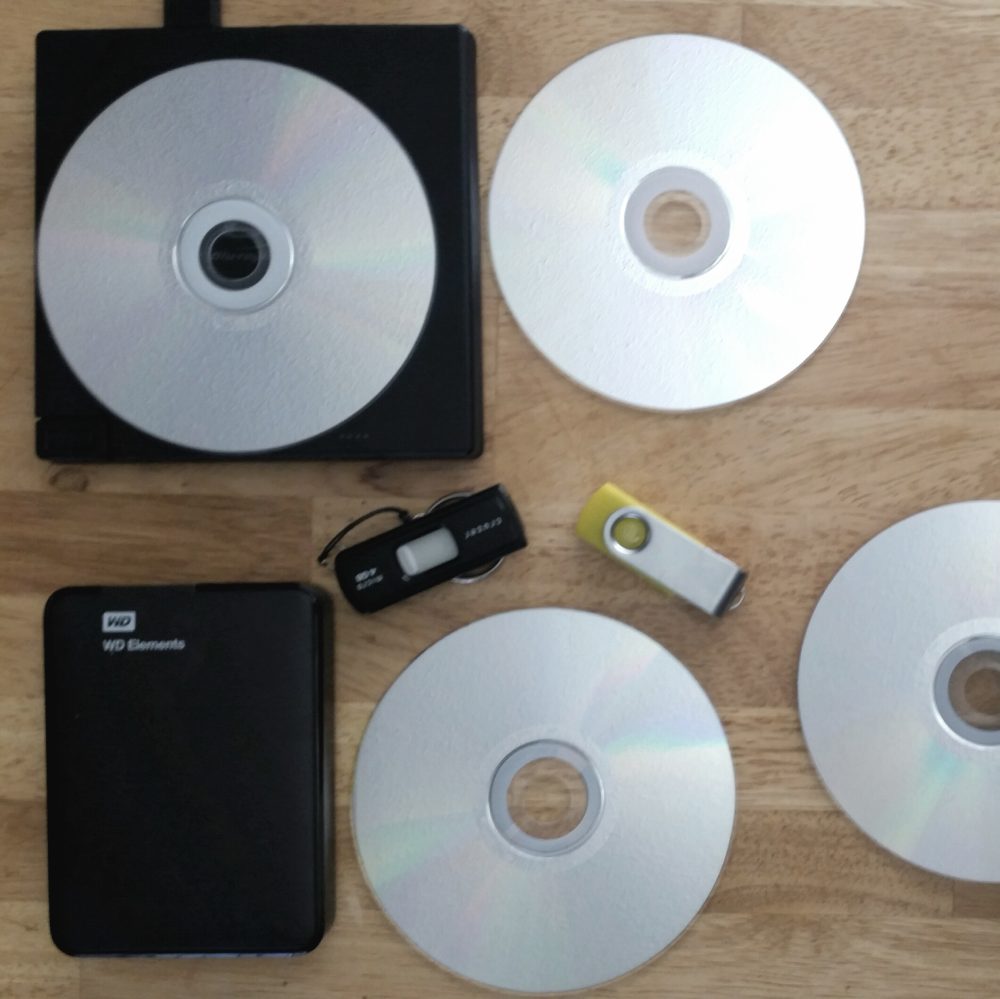
    The first hurdle in trying to migrate to On1 Photo Raw from Adobe Photoshop/Lightroom has already been encountered. And for me it is a major one, is the catalogue database, in particular the location.

    Coming from UNIX background, on my setup the main workstation Operating System (windows) lives on a small 256gb ssd file-system, my LightRoom catalogues are on a dedicated 1tb internal ssd and all my images are out on a many TB NAS. There is no space on the OS file-system to store large catalogues.
    I fear what would happen to the OS file-system if I pointed On1photo to the NAS with almost 50 years of work in poking around the imaging industry.

    I did try fooling it by moving the %appdata%/ON1 folder to the catalogue drive and creating a symlink to it in %appdata% but all on1 did on startup was ignore the symlink and it recreate the local folder, kind of useless. and most likely kills this option as a workable DAM (Digital Asset Management) system.
    In LightRoom you can put the catalogues anywhere and just point to them in the app settings.

    This same issue is what killed my attempt at using ACDsee which also seem to insist on storing it catalogue on %appdata%